

Your thoughts, not their feed.
ThinkFeed puts what you write beside what you scroll. Speak or type a note in a second, see today’s screen time and count the reels you watch. Everything stays on your phone.
- Android · on Google Play in India
- Works offline
- No account, no cloud
Catch the thought before the next reel takes it.
Counts, not just minutes. Notes, not just counts.
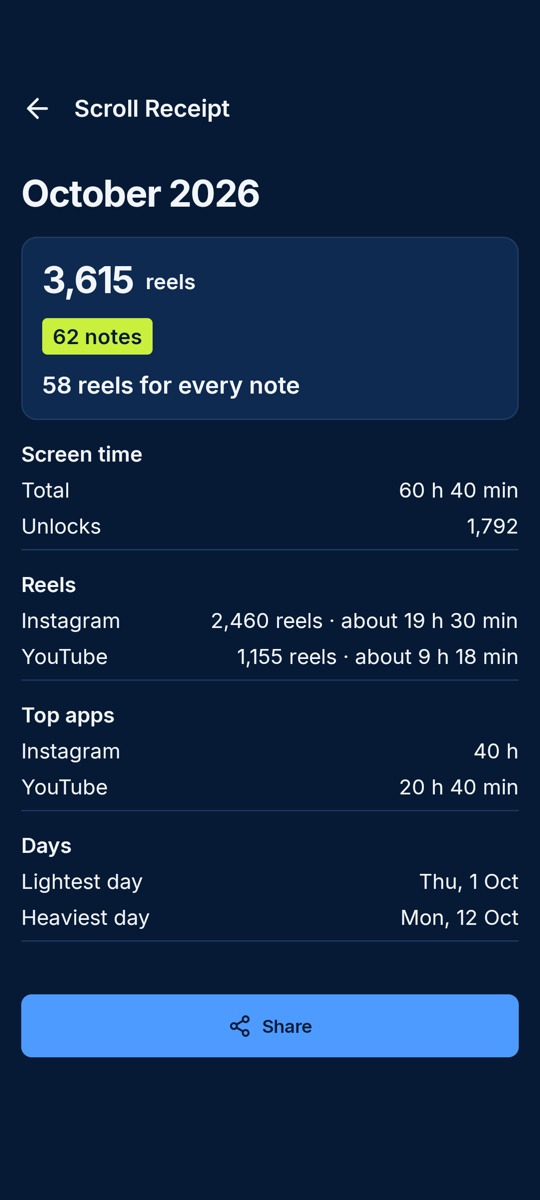
“You watched 1,840 reels and wrote 42 notes this month” is a number you feel. ThinkFeed puts both on one screen.
A note in a second
A blank note opens at once. Search every word, add tags and pin what matters.
Voice notes on your phone
Speak and ThinkFeed turns it into text with Android’s on-device speech. No audio is kept.
Today’s screen time
Time per app, your top five apps and how often you unlocked your phone.
Reel counter (Pro)
Counts each reel and short you watch in Instagram and YouTube. It only counts.
Scroll Receipt (Pro)
Your week and your month: reels, screen time and the notes you wrote, ready to share.
A gentle limit (Pro)
Pick a daily reel limit. When you reach it, one notification offers a voice note instead. Nothing is blocked.
Encrypted on your phone
Notes live in an encrypted database. No account, no cloud, no ads, no analytics.
A backup you control
Export a passphrase-protected file wherever you choose, and restore it on a new phone.
App lock
Open ThinkFeed with your fingerprint, face or screen lock.
Four steps to a feed of your own.
ThinkFeed asks for each permission only when you choose a feature, and explains it first. Every step can wait.
Your notes and habits never leave your phone. Only anonymous purchase information goes to our billing provider when you buy Pro.
The reel counter only counts. It never taps, scrolls, blocks or closes anything in Instagram or YouTube, and you can turn it off at any time.
From scrolling to your own feed
Write or speak
Tap the mic or New note. The thought is saved before the next reel can take it.
See your day
Turn on Usage Access to see today’s screen time, your top apps and your unlocks.
Count your reels
With Pro, turn on the reel counter after ThinkFeed shows you exactly what it reads.
Get your Scroll Receipt
Every week and month: reels beside the notes you wrote, in one number you’ll remember.
Questions, answered.
How do I get ThinkFeed?
Install it from Google Play on your Android phone. It’s available in India first; more countries follow soon.
Is ThinkFeed free?
Notes, voice notes and today’s screen time are free. ThinkFeed Pro adds the reel counter, Scroll Receipts and the daily limit, with a 7-day free trial. In India it costs about ₹1 a day; Google Play shows the price where you live.
Does it need an internet connection?
No. Notes, voice notes and screen time work offline. ThinkFeed only goes online to check a Pro subscription with Google Play. The first voice note may need Android to download its English speech model once, over Wi-Fi; Android does that download, not ThinkFeed.
Where are my notes stored?
Only on your phone, in an encrypted database. ThinkFeed has no account and no cloud. To move to a new phone, export a passphrase-protected backup and restore it there.
What does the reel counter read?
Only which reel or short is on screen in Instagram and YouTube, to tell one from the next. It never reads your messages, what you type or passwords, never acts inside those apps, and the count stays on your phone. ThinkFeed explains all this before you turn it on. See the ThinkFeed privacy policy.
Is ThinkFeed on iPhone?
Not yet. iPhone doesn’t let apps count reels, so ThinkFeed starts on Android.